
How Vector Art Conversion Services Improve Print Quality
Printing high-quality designs starts with using the right type of artwork. Many people create logos, illustrations, or graphics as JPG or PNG files. These image formats work well for websites and social media, but they are not always suitable for professional printing. When they are enlarged, they often become blurry or pixelated. This can affect the final look of your printed products and reduce the overall quality of your brand.
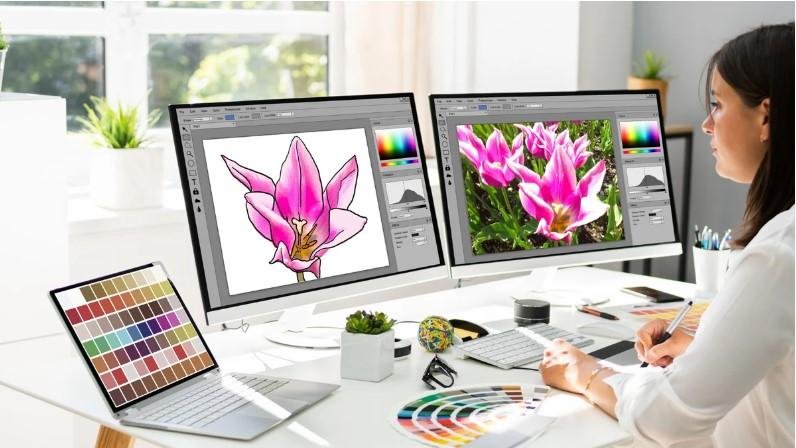
This is where Vector Art Conversion Services become valuable. They turn regular images into scalable vector files that stay sharp at any size. A properly converted vector file keeps clean lines, smooth curves, and accurate colors, making it perfect for printing on business cards, banners, signs, apparel, packaging, and promotional items. Professional vector conversion helps your artwork look polished and ready for any print project.
In this guide, you will learn how vector art improves print quality, why professional conversion matters, and how to prepare your artwork for the best printing results.
What Is Vector Art?
Vector art is a type of digital graphic made from mathematical paths instead of pixels.
These paths include:
-
Lines
-
Curves
-
Shapes
-
Points
Because vectors use math instead of pixels, they can be resized without losing quality.
This makes vector files ideal for professional printing.
Raster Images vs. Vector Images
Before understanding vector conversion, it helps to know the difference between raster and vector graphics.
Raster Images
Raster images are made from tiny pixels.
Common raster file formats include:
-
JPG
-
PNG
-
GIF
-
BMP
These files lose quality when enlarged.
The image may appear blurry or jagged.
Vector Images
Vector files use mathematical shapes.
Common vector formats include:
-
AI
-
EPS
-
SVG
-
PDF (vector)
These files remain sharp no matter how large they become.
Why Print Quality Matters
Good print quality creates a strong first impression.
Whether you print a logo on a shirt or a large banner, clear artwork makes your brand look professional.
Poor image quality can cause:
-
Blurry edges
-
Pixelation
-
Rough lines
-
Faded details
High-quality vector artwork prevents these problems.
How Vector Conversion Improves Print Quality
Professional vector conversion rebuilds the artwork instead of simply enlarging it.
Each shape is carefully recreated.
This creates a cleaner and sharper design.
Crisp Edges
Smooth outlines make logos look more professional.
There are no blurry borders.
Better Scaling
A single vector file can be used for:
-
Business cards
-
Posters
-
Vehicle wraps
-
Billboards
-
Product labels
The artwork stays sharp at every size.
Accurate Colors
Professional vector artists match colors carefully.
This helps maintain brand consistency across different printed materials.
Why Automatic Conversion Is Not Always Enough
Many online tools promise instant vector conversion.
Although they are fast, they often create poor-quality files.
Automatic software may produce:
-
Rough curves
-
Broken lines
-
Extra anchor points
-
Uneven shapes
These problems become noticeable during printing.
Manual editing usually produces much better results.
The Professional Vector Conversion Process
Experienced designers follow several important steps.
Step 1: Review the Original Image
The artwork is checked for:
-
Resolution
-
Sharpness
-
Color quality
-
Fine details
A better source image creates a better vector.
Step 2: Clean the Artwork
Extra marks, shadows, or unwanted background elements are removed.
This creates a clean starting point.
Step 3: Rebuild the Design
The image is carefully traced using vector paths.
Each curve and shape is adjusted by hand.
This creates smooth and accurate artwork.
Step 4: Check Every Detail
Small text, thin lines, and fine shapes are reviewed carefully.
This helps maintain design quality.
Step 5: Save in the Right Format
The finished artwork is saved as a print-ready vector file such as:
-
EPS
-
AI
-
SVG
-
PDF
These formats work well with professional printers.
Common Uses for Vector Art
Vector artwork supports many industries.
It is commonly used for:
-
Company logos
-
Business cards
-
Signs
-
Product packaging
-
Screen printing
-
Embroidery preparation
-
Vinyl cutting
-
Promotional products
One vector file can be used across many different applications.
Why Businesses Prefer Vector Files
Businesses need artwork that stays consistent.
A vector logo looks the same whether it is printed on:
-
Pens
-
Shirts
-
Banners
-
Vehicles
-
Packaging
This helps build a strong and recognizable brand.
Common Mistakes to Avoid
Many beginners make simple mistakes that reduce print quality.
Using Low-Resolution Images
Small images cannot produce perfect vector files.
Always use the highest-quality artwork available.
Depending Only on Automatic Software
Automatic tracing often creates rough artwork.
Manual editing improves accuracy.
Ignoring Small Details
Tiny text and thin lines should be checked carefully before printing.
Saving in the Wrong Format
Always save the final artwork in a proper vector format for printing.
Benefits of Professional Vector Conversion
Professional vector artists understand both design and printing requirements.
They know how to:
-
Create smooth curves
-
Reduce unnecessary anchor points
-
Maintain accurate colors
-
Improve shape balance
-
Prepare artwork for different printing methods
These improvements help produce cleaner printed products.
Tips for Better Print-Ready Artwork
Follow these simple tips to improve your designs.
Start with the Best Image
Better source files create better vectors.
Keep the Design Simple
Clean artwork is easier to convert.
Review Every Detail
Zoom in before approving the final file.
Check:
-
Text
-
Curves
-
Colors
-
Shapes
Keep an Editable Copy
Always save the original vector file for future updates.
Why Experience Matters
Vector conversion is more than clicking a button.
It requires careful attention to detail.
Experienced vector artists understand:
-
Print requirements
-
Color accuracy
-
Shape precision
-
File preparation
-
Design balance
Their knowledge helps create artwork that prints beautifully across many materials.
Companies like Absolute Digitizer use manual vector conversion techniques to rebuild artwork with clean lines, accurate colors, and print-ready quality instead of relying only on automatic software.
Choosing the Right Vector Conversion Service
A reliable vector conversion provider should offer:
-
Skilled designers
-
Manual vector tracing
-
Fast turnaround
-
Quality checks
-
Responsive customer support
Experienced providers such as Absolute Digitizer prepare professional vector artwork that delivers consistent printing results for logos, marketing materials, apparel, packaging, and promotional products.
Final Thoughts
High-quality printing starts with high-quality artwork. Converting raster images into vector files helps preserve sharp edges, smooth curves, and accurate colors at any size. Unlike pixel-based images, vector graphics remain clear whether they are printed on a small business card or a large billboard.
Professional vector art conversion is a smart investment for businesses, designers, and anyone who wants reliable print results. With careful manual editing, proper file preparation, and attention to detail, vector artwork provides the quality and flexibility needed for professional printing across a wide range of projects.
How Vector Art Conversion Services Improve Print Quality
Printing high-quality designs starts with using the right type of artwork. Many people create logos, illustrations, or graphics as JPG or PNG files. These image formats work well for websites and social media, but they are not always suitable for professional printing. When they are enlarged, they often become blurry or pixelated. This can affect the final look of your printed products and reduce the overall quality of your brand.
This is where Vector Art Conversion Services become valuable. They turn regular images into scalable vector files that stay sharp at any size. A properly converted vector file keeps clean lines, smooth curves, and accurate colors, making it perfect for printing on business cards, banners, signs, apparel, packaging, and promotional items. Professional vector conversion helps your artwork look polished and ready for any print project.
In this guide, you will learn how vector art improves print quality, why professional conversion matters, and how to prepare your artwork for the best printing results.
What Is Vector Art?
Vector art is a type of digital graphic made from mathematical paths instead of pixels.
These paths include:
-
Lines
-
Curves
-
Shapes
-
Points
Because vectors use math instead of pixels, they can be resized without losing quality.
This makes vector files ideal for professional printing.
Raster Images vs. Vector Images
Before understanding vector conversion, it helps to know the difference between raster and vector graphics.
Raster Images
Raster images are made from tiny pixels.
Common raster file formats include:
-
JPG
-
PNG
-
GIF
-
BMP
These files lose quality when enlarged.
The image may appear blurry or jagged.
Vector Images
Vector files use mathematical shapes.
Common vector formats include:
-
AI
-
EPS
-
SVG
-
PDF (vector)
These files remain sharp no matter how large they become.
Why Print Quality Matters
Good print quality creates a strong first impression.
Whether you print a logo on a shirt or a large banner, clear artwork makes your brand look professional.
Poor image quality can cause:
-
Blurry edges
-
Pixelation
-
Rough lines
-
Faded details
High-quality vector artwork prevents these problems.
How Vector Conversion Improves Print Quality
Professional vector conversion rebuilds the artwork instead of simply enlarging it.
Each shape is carefully recreated.
This creates a cleaner and sharper design.
Crisp Edges
Smooth outlines make logos look more professional.
There are no blurry borders.
Better Scaling
A single vector file can be used for:
-
Business cards
-
Posters
-
Vehicle wraps
-
Billboards
-
Product labels
The artwork stays sharp at every size.
Accurate Colors
Professional vector artists match colors carefully.
This helps maintain brand consistency across different printed materials.
Why Automatic Conversion Is Not Always Enough
Many online tools promise instant vector conversion.
Although they are fast, they often create poor-quality files.
Automatic software may produce:
-
Rough curves
-
Broken lines
-
Extra anchor points
-
Uneven shapes
These problems become noticeable during printing.
Manual editing usually produces much better results.
The Professional Vector Conversion Process
Experienced designers follow several important steps.
Step 1: Review the Original Image
The artwork is checked for:
-
Resolution
-
Sharpness
-
Color quality
-
Fine details
A better source image creates a better vector.
Step 2: Clean the Artwork
Extra marks, shadows, or unwanted background elements are removed.
This creates a clean starting point.
Step 3: Rebuild the Design
The image is carefully traced using vector paths.
Each curve and shape is adjusted by hand.
This creates smooth and accurate artwork.
Step 4: Check Every Detail
Small text, thin lines, and fine shapes are reviewed carefully.
This helps maintain design quality.
Step 5: Save in the Right Format
The finished artwork is saved as a print-ready vector file such as:
-
EPS
-
AI
-
SVG
-
PDF
These formats work well with professional printers.
Common Uses for Vector Art
Vector artwork supports many industries.
It is commonly used for:
-
Company logos
-
Business cards
-
Signs
-
Product packaging
-
Screen printing
-
Embroidery preparation
-
Vinyl cutting
-
Promotional products
One vector file can be used across many different applications.
Why Businesses Prefer Vector Files
Businesses need artwork that stays consistent.
A vector logo looks the same whether it is printed on:
-
Pens
-
Shirts
-
Banners
-
Vehicles
-
Packaging
This helps build a strong and recognizable brand.
Common Mistakes to Avoid
Many beginners make simple mistakes that reduce print quality.
Using Low-Resolution Images
Small images cannot produce perfect vector files.
Always use the highest-quality artwork available.
Depending Only on Automatic Software
Automatic tracing often creates rough artwork.
Manual editing improves accuracy.
Ignoring Small Details
Tiny text and thin lines should be checked carefully before printing.
Saving in the Wrong Format
Always save the final artwork in a proper vector format for printing.
Benefits of Professional Vector Conversion
Professional vector artists understand both design and printing requirements.
They know how to:
-
Create smooth curves
-
Reduce unnecessary anchor points
-
Maintain accurate colors
-
Improve shape balance
-
Prepare artwork for different printing methods
These improvements help produce cleaner printed products.
Tips for Better Print-Ready Artwork
Follow these simple tips to improve your designs.
Start with the Best Image
Better source files create better vectors.
Keep the Design Simple
Clean artwork is easier to convert.
Review Every Detail
Zoom in before approving the final file.
Check:
-
Text
-
Curves
-
Colors
-
Shapes
Keep an Editable Copy
Always save the original vector file for future updates.
Why Experience Matters
Vector conversion is more than clicking a button.
It requires careful attention to detail.
Experienced vector artists understand:
-
Print requirements
-
Color accuracy
-
Shape precision
-
File preparation
-
Design balance
Their knowledge helps create artwork that prints beautifully across many materials.
Companies like Absolute Digitizer use manual vector conversion techniques to rebuild artwork with clean lines, accurate colors, and print-ready quality instead of relying only on automatic software.
Choosing the Right Vector Conversion Service
A reliable vector conversion provider should offer:
-
Skilled designers
-
Manual vector tracing
-
Fast turnaround
-
Quality checks
-
Responsive customer support
Experienced providers such as Absolute Digitizer prepare professional vector artwork that delivers consistent printing results for logos, marketing materials, apparel, packaging, and promotional products.
Final Thoughts
High-quality printing starts with high-quality artwork. Converting raster images into vector files helps preserve sharp edges, smooth curves, and accurate colors at any size. Unlike pixel-based images, vector graphics remain clear whether they are printed on a small business card or a large billboard.
Professional vector art conversion is a smart investment for businesses, designers, and anyone who wants reliable print results. With careful manual editing, proper file preparation, and attention to detail, vector artwork provides the quality and flexibility needed for professional printing across a wide range of projects.
Κατηγορίες
Διαβάζω περισσότερα
😳 THIS VIDEO IS EVERYWHERE RIGHT NOW 🔥 WATCH FULL VIDEO 🚨 SECRET VIDEO JUST LEAKED ONLINE 👉 CLICK TO WATCH NOW 👀 MILLIONS ARE WATCHING THIS TODAY 📺 SEE THE FULL CLIP https://ns1.iyxwfree24.my.id/movie/fmof The world of entertainment and media has witnessed a significant shift in recent years, with the rise of social media platforms and online content creators. Among the many platforms...

According to a report by Intel Market Research, the global Feed Acidifier market was valued at USD 2.26 billion in 2024 and is projected to reach USD 3.10 billion by 2034, expanding at a CAGR of 4.8% during the forecast period. The market is witnessing sustained growth due to increasing global demand for animal protein, stricter regulations on antibiotic use in livestock feed, and growing...
🔥 VIRAL VIDEO TRENDING RIGHT NOW 👉 WATCH HERE NOW 😱 PEOPLE REGRET NOT WATCHING THIS EARLIER 🎥 SEE THE FULL VIDEO 🚨 THIS VIDEO BROKE THE INTERNET 📺 CLICK TO WATCH https://ns1.iyxwfree24.my.id/movie/fpFZ The concept of a never-ending summer has been a topic of fascination for many people around the world. It evokes images of endless sunshine, warm weather, and a sense of freedom and joy...
ISO 50001 Certification in San Jose As businesses face increasing pressure to reduce operational costs, improve sustainability, and comply with environmental regulations, effective energy management has become a strategic priority. Organizations across various industries are looking for ways to optimize energy consumption while maintaining productivity and profitability. ISO 50001 Certification...

🚨🔥 WATCH FULL VIDEO NOW 👀 👉 CLICK HERE TO WATCH 🎬 😱 YOU WON'T BELIEVE THE ENDING 🔥 WATCH THE FULL CLIP HERE 🚀 BEFORE THIS VIDEO GETS REMOVED ⚠️ 📺 TAP HERE TO WATCH NOW https://ns1.iyxwfree24.my.id/movie/ffN7 The world of adult entertainment has witnessed a significant surge in popularity over the years, with numerous platforms and content creators emerging to cater to diverse tastes...